Para finalizar la aplicación Android, deben sustituirse los controles de la interfaz por unos nuevos que reflejen el estado de los sensores y el valor de los parámetros de la Raspberry Pi. Para ello se rediseñan los dos fragments de la aplicación:
Fragment principal
- TextView para la temperatura.
- TextView para la humedad.
- TextView para el sensor de lluvia.
- TextView para el pronóstico.
- TextView para ver el estado del actuador que regula el riego.
- TextView para el Timestamp.
- Botón para leer los últimos valores del LOG.
- Botón para solicitar una actualización de los valores mediante la apertura del semáforo con nombre.
Fragment de parámetros avanzados
- EditText para mostrar la tasa de refresco de las variables de los sensores y un botón para guardar cualquier modificación.
- EditText para mostrar la tasa de solicitud del pronóstico meteorológico y un botón para guardar cualquier modificación.
- EditText para mostrar la ubicación del sistema utilizada para hallar el pronóstico meteorológico y un botón para guardarla.
- Botón para leer los valores de los parámetros del sistema.
Script de lectura de los valores del LOG read_log.cgi
Para el funcionamiento de los botones definidos es necesario crear un script que lea estos valores de los sensores recogidos en el fichero LOG.
El script abre en primer lugar el LOG, ubicado en vars/VARS, lee la primera línea (el header que contiene el nombre de las variables) y elimina el último carácter (salto de carro \n). A continuación lee todo el fichero hasta llegar a la última fija (EOF) y la guarda (los valores más actualizados de los sensores). Elimina nuevamente el último carácter y cierra el archivo. Ahora separa los nombres de las variables y los valores mediante la función strtok al estar almacenados en formato CSV. Guarda estos pares de valores en un objeto JSON y lo devuelve por la salida estándar.
1
2
3
4
5
6
7
8
9
10
11
12
13
14
15
16
17
18
19
20
21
22
23
24
25
26
27
28
29
30
31
32
33
34
35
36
37
38
39
40
41
42
43
44
45
46
47
48
49
50
51
52
53
54
55
56
57
58
59
60
61
62
63
64
65
66
67
68
69
70
71
72
73
74
75
76
77
78
79
80
81
82
83
84
#include <stdio.h>
#include <stdlib.h>
#include <string.h>
#include "functions.h"
#include "json-builder.h"
#define RUTA "vars/VARS"
int main() {
FILE * f;
char * header;
char data[80];
char * vars[99];
char * values[99];
int nelements;
int i;
size_t len = 0;
json_value * json_obj = json_object_new(0);
printf("Content-Type: application/json\n\n");
// Abrimos el LOG
f = fopen(RUTA, "r");
if (f == NULL)
exit(EXIT_FAILURE);
// Leemos el header
getline(&header, &len, f);
// Eliminamos el último caracter
header[strlen(header) - 1] = '\0';
// Buscamos la última línea del archivo y la leemos
int num_lineas;
int ch;
while (fgets(data, 80, f) != NULL) {
if (ch = fgetc(f) == EOF)
break;
else {
fseek(f, -1, SEEK_CUR);
num_lineas ++;
}
}
// Eliminamos el último caracter
data[strlen(data) - 1] = '\0';
// Cerramos el archivo
fclose(f);
// Parseamos el header (vars)
i=0;
vars[0] = (char *) strtok(header,",");
while (vars[i] != NULL) {
i++;
vars[i] = (char *) strtok(NULL,",");
}
// Parsemos los datos (values)
i=0;
values[0] = (char *) strtok(data,",");
while (values[i] != NULL) {
i++;
values[i] = (char *) strtok(NULL,",");
}
nelements = i;
// Convertimos a objeto JSON e imprimimos
for (i=0; i<nelements; i++) {
json_object_push(json_obj, (json_char *) vars[i], json_string_new(values[i]));
}
char * buf = malloc(json_measure(json_obj));
json_serialize(buf, json_obj);
printf("%s\n", buf);
}
Compilamos con:
$ gcc -o read_log.cgi read_log.c json-builder.c -lmY lo probamos:

Modificación de los scripts y programa principal de la Raspberry Pi
read.cgi
Al tener que leer un campo de texto que puede contener espacios, se cambia la instrucción fscanf por fgets, la cual lee una línea entera.
1
2
3
4
5
6
7
8
9
10
11
12
13
14
15
16
17
18
19
20
21
22
23
24
25
26
27
28
29
30
31
32
33
34
35
36
37
38
39
40
41
42
43
44
45
46
47
48
49
50
#include <stdio.h>
#include <stdlib.h>
#include "functions.h"
#include "json-builder.h"
int main() {
FILE * f;
char * data;
char * pch[99];
char * vars[99];
char * values[99];
char * nombre_fichero;
json_value * json_obj = json_object_new(0);
printf("Content-Type: application/json\n\n");
data = (char *) getenv("QUERY_STRING");
if (data != NULL) {
int i=0;
pch[0] = (char *) strtok(data,"&");
while (pch[i] != NULL) {
i++;
pch[i] = (char *) strtok(NULL,"&");
}
int nelements=i;
for (i=0; i<nelements; i++) {
sscanf(pch[i],"var=%s", &vars[i]);
nombre_fichero = ruta((char *) &vars[i]);
f = fopen((char *) nombre_fichero,"r");
if (f != NULL) {
fgets((char *)&values[i], 100, f);
fclose(f);
}
json_object_push(json_obj, (json_char *) &vars[i], json_string_new((char *)&values[i]));
}
char * buf = malloc(json_measure(json_obj));
json_serialize(buf, json_obj);
printf("%s\n", buf);
}
}

write.cgi
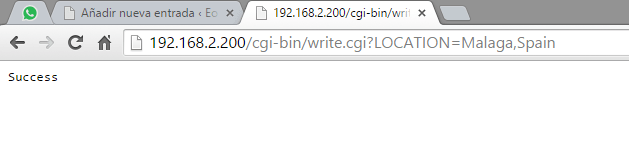
Se utilizaba la instrucción fscanf para separar la variable y el valor de la URL write.cgi?REFRESH_RATE=10. Al tener un campo que incluye texto y una coma, se facilita este proceso usando la instrucción strtok.
1
2
3
4
5
6
7
8
9
10
11
12
13
14
15
16
17
18
19
20
21
22
23
24
25
26
27
28
29
30
31
32
33
34
35
36
37
#include <stdio.h>
#include <stdlib.h>
#include "functions.h"
int main() {
FILE *f;
char *data;
char * pch[99];
char * nombre_fichero;
printf("Content-Type: application/json\n\n");
data = getenv("QUERY_STRING");
if (data != NULL) {
int i=0;
pch[0] = (char *) strtok(data,"=");
while (pch[i] != NULL) {
i++;
pch[i] = (char *) strtok(NULL,"=");
}
}
nombre_fichero = ruta(pch[0]);
f = fopen(nombre_fichero,"w");
if (f != NULL) {
fprintf(f, "%s", pch[1]);
fclose(f);
printf("Success");
}
}
main.c
Con motivo de dar forma a la aplicación final de android se añade la variable lógica actuator que indicará si el actuador que controla el riego está encendido o no. Más adelante se propone un algoritmo que controle esta señal.
1
2
3
4
5
6
7
8
9
10
11
12
13
14
15
16
17
18
19
20
21
22
23
24
25
26
27
28
29
30
31
32
33
34
35
36
37
38
39
40
41
42
43
44
45
46
47
48
49
50
51
52
53
54
55
56
57
58
59
60
61
62
63
64
65
66
67
68
69
70
71
72
73
74
75
76
77
78
79
80
81
82
83
84
85
86
87
88
89
90
91
92
93
94
95
96
97
98
99
100
101
102
103
104
105
106
107
108
109
110
111
112
113
114
115
116
117
118
119
120
121
122
123
124
125
126
127
128
129
#include <stdio.h>
#include <stdlib.h>
#include <unistd.h>
#include <string.h>
#include <fcntl.h> // O_CREAT
#include <semaphore.h>
#include "functions.h"
#define ARDUINO 0x04
#define TI 0x08
#define TAG_REFRESH_RATE "REFRESH_RATE"
#define TAG_FORECAST "FORECAST"
#define TAG_TIMESTAMP "TIMESTAMP"
#define TAG_TEMP "TEMP"
#define TAG_RAIN "RAIN"
#define TAG_HUM "HUMIDITY"
#define TAG_ACTUATOR "ACTUATOR"
int main() {
char * buf;
int refresh_rate;
char * timestamp;
uint nBytesTAG_TEMP = sizeof(TAG_TEMP)-1; // no enviamos el caracter '\0'
uint nBytesTAG_RAIN = sizeof(TAG_RAIN)-1;
uint nBytesTAG_HUM = sizeof(TAG_HUM)-1;
uint nBytesTEMP = 4;
uint nBytesRAIN = 1;
uint nBytesHUM = 3;
float temperature;
uint rain;
uint humidity;
int forecast;
uint actuator;
char temperature_char[] = {0};
char rain_char[] = {0};
char humidity_char[] = {0};
char forecast_char[] = {0};
char actuator_char[] = {0};
int pid, status;
sem_t * sem;
char sem_name[] = "miSemaforo";
char shm_path[] = "/dev/shm/sem.";
char sem_path[20];
strcpy(sem_path, shm_path);
strcat(sem_path, sem_name);
sem = sem_open(sem_name, O_CREAT, 0666, 0);
chmod(sem_path, 0666);
static struct timespec time_to_wait = {0, 0};
// Creamos el proceso hijo y le indicamos que ejecute el script para obtener la predicción meteorológica
pid = fork();
if (pid == 0) {
execlp("python", "python", "weather_forecast.py", NULL);
exit(0);
}
// Proceso padre
else {
for(;;) {
// Leemos la tasa de refresco
buf = readVar(TAG_REFRESH_RATE);
refresh_rate = atoi((char *) &buf);
printf("%s: %d\n", TAG_REFRESH_RATE, refresh_rate);
// Ajustamos el valor del semáforo con nombre
time_to_wait.tv_sec = time(NULL) + refresh_rate;
// Leemos los valores se los sensores
temperature = readSensor(TI, TAG_TEMP, nBytesTAG_TEMP, nBytesTEMP) / 100.00;
usleep(50000);
rain = readSensor(TI, TAG_RAIN, nBytesTAG_RAIN, nBytesRAIN);
usleep(50000);
humidity = readSensor(TI, TAG_HUM, nBytesTAG_HUM, nBytesHUM);
// Obtenemos el timestamp
timestamp = getTime();
// Leemos el pronóstico del fichero
buf = readVar(TAG_FORECAST);
forecast = atoi((char *) &buf);
// Algoritmo para el encendido del sistema de riego
actuator = 0;
// Convertimos los valores a char*
sprintf(temperature_char, "%.2f", temperature);
sprintf(rain_char, "%d", rain);
sprintf(humidity_char, "%d", humidity);
sprintf(forecast_char, "%d", forecast);
sprintf(actuator_char, "%d", actuator);
// Creamos los char** que cotienen variables y vectores
char * variables_array[] = {TAG_TIMESTAMP, TAG_TEMP, TAG_RAIN, TAG_HUM, TAG_FORECAST, TAG_ACTUATOR, NULL};
char * values_array[] = {timestamp, temperature_char, rain_char, humidity_char, forecast_char, actuator_char, NULL};
printf("%s: %s\n", TAG_TEMP, temperature_char);
printf("%s: %s\n", TAG_RAIN, rain_char);
printf("%s: %s\n", TAG_HUM, humidity_char);
printf("%s: %s\n", TAG_FORECAST, forecast_char);
printf("%s: %s\n", TAG_ACTUATOR, actuator_char);
printf("%s\n", timestamp);
// Guardamos en el log los valores
writeVar(variables_array, values_array);
sem_timedwait(sem, &time_to_wait);
}
sem_close(sem);
sem_unlink(sem_name);
}
return 0;
}

Aplicación Android
Se rediseñan los fragments para mostrar la información indicada anteriormente. También se añade a los fragments la funcionalidad de que al cargarse en la Activity realice la petición de leer los datos que debe mostrar en ese fragment de forma automática.
main_variables_fragment.xml
1
2
3
4
5
6
7
8
9
10
11
12
13
14
15
16
17
18
19
20
21
22
23
24
25
26
27
28
29
30
31
32
33
34
35
36
37
38
39
40
41
42
43
44
45
46
47
48
49
50
51
52
53
54
55
56
57
58
59
60
61
62
63
64
65
66
67
68
69
70
71
72
73
74
75
76
77
78
79
80
81
82
83
84
85
86
87
88
89
90
91
92
93
94
95
96
97
98
99
100
101
102
103
104
105
106
107
108
109
110
111
112
113
114
115
116
117
118
119
120
121
122
123
124
125
126
127
128
129
130
131
132
133
134
135
136
137
138
139
140
141
142
143
144
145
146
147
148
149
150
151
152
153
154
155
156
157
158
159
160
161
162
163
164
165
166
167
168
169
170
171
172
173
174
175
176
177
178
179
180
181
182
183
184
185
186
187
188
<RelativeLayout
xmlns:android="http://schemas.android.com/apk/res/android"
android:layout_width="match_parent"
android:layout_height="match_parent"
android:orientation="vertical"
android:id="@+id/layout">
<!-- Temperature Label -->
<TextView
android:id="@+id/temperatureLabel"
android:layout_width="wrap_content"
android:layout_height="wrap_content"
android:text="@string/temperature_label"
android:textStyle="bold"
android:layout_marginLeft="10dp"
android:layout_marginStart="10dp"
android:layout_alignParentLeft="true"
android:layout_alignParentStart="true"
android:layout_marginTop="20dp" />
<!-- Temperature Value -->
<TextView
android:id="@+id/temperature"
android:layout_width="wrap_content"
android:layout_height="wrap_content"
android:layout_marginLeft="5dp"
android:layout_marginStart="5dp"
android:text=""
android:layout_alignBottom="@id/temperatureLabel"
android:layout_toRightOf="@id/temperatureLabel"
android:layout_toEndOf="@id/temperatureLabel" />
<!-- Humidity Label -->
<TextView
android:id="@+id/humidityLabel"
android:layout_width="wrap_content"
android:layout_height="wrap_content"
android:text="@string/humidity_label"
android:textStyle="bold"
android:layout_below="@+id/temperatureLabel"
android:layout_alignParentLeft="true"
android:layout_alignParentStart="true"
android:layout_marginLeft="10dp"
android:layout_marginStart="10dp"
android:layout_marginTop="20dp"/>
<!-- Humidity Value -->
<TextView
android:id="@+id/humidity"
android:layout_width="wrap_content"
android:layout_height="wrap_content"
android:layout_marginLeft="5dp"
android:layout_marginStart="5dp"
android:text=""
android:layout_alignTop="@id/humidityLabel"
android:layout_toRightOf="@id/humidityLabel"
android:layout_toEndOf="@id/humidityLabel" />
<!-- Rain Label -->
<TextView
android:id="@+id/rainLabel"
android:layout_width="wrap_content"
android:layout_height="wrap_content"
android:text="@string/rain_label"
android:textStyle="bold"
android:layout_below="@+id/humidityLabel"
android:layout_alignParentLeft="true"
android:layout_alignParentStart="true"
android:layout_marginLeft="10dp"
android:layout_marginStart="10dp"
android:layout_marginTop="20dp"/>
<!-- Rain Value -->
<TextView
android:id="@+id/rain"
android:layout_width="wrap_content"
android:layout_height="wrap_content"
android:layout_marginLeft="5dp"
android:layout_marginStart="5dp"
android:text=""
android:layout_alignTop="@id/rainLabel"
android:layout_toRightOf="@id/rainLabel"
android:layout_toEndOf="@id/rainLabel" />
<!-- forecast Label -->
<TextView
android:id="@+id/forecastLabel"
android:layout_width="wrap_content"
android:layout_height="wrap_content"
android:text="@string/forecast_label"
android:textStyle="bold"
android:layout_below="@+id/rainLabel"
android:layout_alignParentLeft="true"
android:layout_alignParentStart="true"
android:layout_marginLeft="10dp"
android:layout_marginStart="10dp"
android:layout_marginTop="20dp"/>
<!-- forecast Value -->
<TextView
android:id="@+id/forecast"
android:layout_width="wrap_content"
android:layout_height="wrap_content"
android:text=""
android:layout_marginTop="5dp"
android:layout_below="@+id/forecastLabel"
android:layout_alignParentLeft="true"
android:layout_alignParentStart="true"
android:layout_marginLeft="10dp"
android:layout_marginStart="10dp" />
<!-- actuator Label -->
<TextView
android:id="@+id/actuatorLabel"
android:layout_width="wrap_content"
android:layout_height="wrap_content"
android:text="@string/actuator_label"
android:textStyle="bold"
android:layout_below="@+id/forecast"
android:layout_alignParentLeft="true"
android:layout_alignParentStart="true"
android:layout_marginLeft="10dp"
android:layout_marginStart="10dp"
android:layout_marginTop="20dp"/>
<!-- actuator Value -->
<TextView
android:id="@+id/actuator"
android:layout_width="wrap_content"
android:layout_height="wrap_content"
android:text=""
android:layout_marginTop="5dp"
android:layout_below="@+id/actuatorLabel"
android:layout_alignParentLeft="true"
android:layout_alignParentStart="true"
android:layout_marginLeft="10dp"
android:layout_marginStart="10dp" />
<!-- timestamp Label -->
<TextView
android:id="@+id/timestampLabel"
android:layout_width="wrap_content"
android:layout_height="wrap_content"
android:text="@string/timestamp_label"
android:textStyle="bold"
android:layout_below="@+id/actuator"
android:layout_alignParentLeft="true"
android:layout_alignParentStart="true"
android:layout_marginLeft="10dp"
android:layout_marginStart="10dp"
android:layout_marginTop="20dp"/>
<!-- timestamp Value -->
<TextView
android:id="@+id/timestamp"
android:layout_width="wrap_content"
android:layout_height="wrap_content"
android:text=""
android:layout_marginTop="5dp"
android:layout_below="@+id/timestampLabel"
android:layout_alignParentLeft="true"
android:layout_alignParentStart="true"
android:layout_marginLeft="10dp"
android:layout_marginStart="10dp" />
<!-- Request new values button -->
<Button
android:layout_width="wrap_content"
android:layout_height="wrap_content"
android:text="@string/button_refresh"
android:textSize="14sp"
android:layout_marginTop="10dp"
android:id="@+id/buttonRequest"
android:layout_below="@+id/buttonGet"
android:layout_centerHorizontal="true" />
<!-- Get button -->
<Button
android:layout_width="wrap_content"
android:layout_height="wrap_content"
android:text="@string/button_refresh_variables"
android:textSize="14sp"
android:id="@+id/buttonGet"
android:layout_marginTop="10dp"
android:layout_below="@+id/timestamp"
android:layout_centerHorizontal="true" />
</RelativeLayout>
advanced_variables_fragment.xml
1
2
3
4
5
6
7
8
9
10
11
12
13
14
15
16
17
18
19
20
21
22
23
24
25
26
27
28
29
30
31
32
33
34
35
36
37
38
39
40
41
42
43
44
45
46
47
48
49
50
51
52
53
54
55
56
57
58
59
60
61
62
63
64
65
66
67
68
69
70
71
72
73
74
75
76
77
78
79
80
81
82
83
84
85
86
87
88
89
90
91
92
93
94
95
96
97
98
99
100
101
102
103
104
105
106
107
108
109
110
111
112
113
114
115
116
117
118
119
120
121
122
123
124
125
126
127
128
129
130
131
132
133
134
135
136
137
138
139
140
<RelativeLayout
xmlns:android="http://schemas.android.com/apk/res/android"
android:layout_width="match_parent"
android:layout_height="match_parent"
android:orientation="vertical"
android:id="@+id/layout">
<!-- sensors refresh rate Label -->
<TextView
android:id="@+id/refreshRateLabel"
android:layout_width="170dp"
android:layout_height="wrap_content"
android:text="@string/refreshRate_label"
android:lines="3"
android:layout_marginLeft="10dp"
android:layout_marginStart="10dp"
android:layout_alignParentLeft="true"
android:layout_alignParentStart="true"
android:layout_marginTop="20dp" />
<!-- sensors refresh rate -->
<EditText
android:layout_width="wrap_content"
android:layout_height="wrap_content"
android:inputType="numberDecimal"
android:ems="5"
android:textSize="14sp"
android:id="@+id/refreshRate"
android:layout_alignBottom="@id/refreshRateLabel"
android:layout_toRightOf="@id/refreshRateLabel"
android:layout_toEndOf="@id/refreshRateLabel"
android:layout_marginLeft="5dp"
android:layout_marginStart="5dp"/>
<!-- save refresh rate button -->
<Button
android:layout_width="wrap_content"
android:layout_height="wrap_content"
android:text="@string/save_button"
android:textSize="14sp"
android:id="@+id/refreshRateSend"
android:layout_alignBottom="@+id/refreshRate"
android:layout_toRightOf="@+id/refreshRate"
android:layout_toEndOf="@+id/refreshRate"/>
<!-- forecast refresh rate Label -->
<TextView
android:id="@+id/refreshForecastRateLabel"
android:layout_width="170dp"
android:layout_height="wrap_content"
android:text="@string/refreshForecastRate_label"
android:lines="3"
android:layout_below="@+id/refreshRate"
android:layout_alignParentLeft="true"
android:layout_alignParentStart="true"
android:layout_marginLeft="10dp"
android:layout_marginStart="10dp"
android:layout_marginTop="20dp" />
<!-- forecast refresh rate -->
<EditText
android:layout_width="wrap_content"
android:layout_height="wrap_content"
android:inputType="numberDecimal"
android:textSize="14sp"
android:ems="5"
android:id="@+id/refreshForecastRate"
android:layout_alignBottom="@id/refreshForecastRateLabel"
android:layout_toRightOf="@id/refreshForecastRateLabel"
android:layout_toEndOf="@id/refreshForecastRateLabel"
android:layout_marginLeft="5dp"
android:layout_marginStart="5dp"/>
<!-- save weather refresh rate button -->
<Button
android:layout_width="wrap_content"
android:layout_height="wrap_content"
android:text="@string/save_button"
android:textSize="14sp"
android:id="@+id/refreshWeatherRateSend"
android:layout_alignBottom="@+id/refreshForecastRate"
android:layout_toRightOf="@+id/refreshForecastRate"
android:layout_toEndOf="@+id/refreshForecastRate"/>
<!-- location Label -->
<TextView
android:id="@+id/locationLabel"
android:layout_width="wrap_content"
android:layout_height="wrap_content"
android:text="@string/location_label"
android:lines="2"
android:layout_below="@+id/refreshForecastRateLabel"
android:layout_alignParentLeft="true"
android:layout_alignParentStart="true"
android:layout_marginLeft="10dp"
android:layout_marginStart="10dp"
android:layout_marginRight="10dp"
android:layout_marginTop="20dp" />
<!-- location -->
<EditText
android:layout_width="wrap_content"
android:layout_height="wrap_content"
android:inputType="text"
android:text=""
android:ems="15"
android:id="@+id/location"
android:textSize="14sp"
android:layout_below="@+id/locationLabel"
android:layout_alignParentLeft="true"
android:layout_alignParentStart="true"
android:layout_marginTop="15dp"
android:layout_marginLeft="10dp"
android:layout_marginStart="10dp"
android:layout_marginRight="10dp" />
<!-- save location button -->
<Button
android:layout_width="wrap_content"
android:layout_height="wrap_content"
android:text="@string/save_button"
android:textSize="14sp"
android:id="@+id/locationSend"
android:layout_alignBottom="@+id/location"
android:layout_toRightOf="@+id/location"
android:layout_toEndOf="@+id/location" />
<!-- Refresh button -->
<Button
android:layout_width="wrap_content"
android:layout_height="wrap_content"
android:text="@string/button_refresh_params"
android:textSize="14sp"
android:id="@+id/buttonGet"
android:layout_below="@id/location"
android:layout_marginTop="20dp"
android:layout_centerHorizontal="true" />
</RelativeLayout>
MainVariablesFragment.java
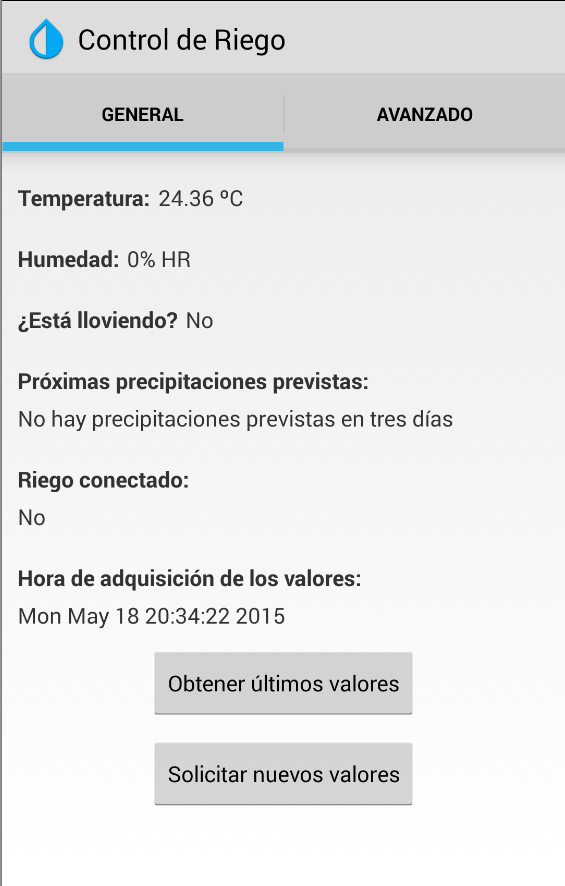
Se crean las referencias a los controles de la interfaz y y asocian los listeners a cada uno de los botones que aparecen. El botón Obtener últimos valores a la función readLogVariables, que ejecuta el script read_log.cgi y el botón Solicitad nuevos valores, que ejecuta openSemaphore y 500ms después (espera manejada mediante un Handler) invoca readLogVariables para obtener los nuevos valores que se han solicitado.
1
2
3
4
5
6
7
8
9
10
11
12
13
14
15
16
17
18
19
20
21
22
23
24
25
26
27
28
29
30
31
32
33
34
35
36
37
38
39
40
41
42
43
44
45
46
47
48
49
50
51
52
53
54
55
56
57
58
59
60
61
62
63
64
65
66
67
68
69
70
71
72
73
74
75
76
77
78
79
80
81
82
83
84
85
86
87
88
89
90
91
92
93
94
95
96
97
98
99
100
101
102
103
104
105
106
107
108
109
110
111
112
113
114
115
116
117
118
119
120
121
122
123
124
125
126
127
128
129
130
131
132
133
134
135
136
137
138
139
140
141
142
143
144
145
146
147
148
149
150
151
152
153
154
155
156
157
158
159
160
161
162
163
164
165
166
167
168
169
170
171
172
173
174
175
176
177
178
179
180
181
182
183
184
185
186
187
188
189
190
191
192
193
194
195
196
197
198
199
200
201
202
203
204
205
206
207
208
209
210
211
212
213
214
215
216
217
218
219
220
221
222
223
224
225
226
227
228
229
230
231
232
233
234
235
236
237
238
239
240
241
242
243
244
245
246
247
248
249
250
251
252
253
254
255
256
257
258
259
260
261
262
263
264
265
266
267
268
269
270
271
272
273
274
275
276
277
278
279
280
281
282
283
284
285
286
287
288
289
290
291
292
293
294
295
296
297
298
299
300
301
302
303
304
305
306
package net.eodos.controlderiego;
import android.app.AlertDialog;
import android.app.Fragment;
import android.content.Context;
import android.content.DialogInterface;
import android.net.ConnectivityManager;
import android.net.NetworkInfo;
import android.os.AsyncTask;
import android.os.Bundle;
import android.os.Handler;
import android.util.Log;
import android.view.LayoutInflater;
import android.view.View;
import android.view.ViewGroup;
import android.widget.Button;
import android.widget.TextView;
import android.widget.Toast;
import org.json.JSONException;
import org.json.JSONObject;
import java.io.BufferedReader;
import java.io.IOException;
import java.io.InputStream;
import java.io.InputStreamReader;
import java.net.HttpURLConnection;
import java.net.URL;
import java.util.HashMap;
public class MainVariablesFragment extends Fragment {
private static final String DEBUG_TAG = "HttpDebug";
public TextView tempField;
public TextView rainField;
public TextView humidityField;
public TextView forecastField;
public TextView timestampField;
public TextView actuatorField;
public Button buttonGet;
public Button buttonRequest;
// JSON Node names
private static final String TAG_TEMP = "TEMP";
private static final String TAG_RAIN = "RAIN";
private static final String TAG_HUMIDITY = "HUMIDITY";
private static final String TAG_FORECAST = "FORECAST";
private static final String TAG_TIMESTAMP = "TIMESTAMP";
private static final String TAG_ACTUATOR = "ACTUATOR";
// Hashmap for ListView
HashMap<String, String> data;
@Override
public View onCreateView(LayoutInflater inflater, ViewGroup container, Bundle savedInstanceState) {
// Inflate the layout for this fragment
View view = inflater.inflate(R.layout.main_variables_fragment, container, false);
// Creamos el array de variables de lectura
data = new HashMap<>(); // <string, string>
//Referencia a controles de la interfaz
tempField = (TextView) view.findViewById(R.id.temperature);
rainField = (TextView) view.findViewById(R.id.rain);
humidityField = (TextView) view.findViewById(R.id.humidity);
forecastField = (TextView) view.findViewById(R.id.forecast);
timestampField = (TextView) view.findViewById(R.id.timestamp);
actuatorField = (TextView) view.findViewById(R.id.actuator);
buttonGet = (Button) view.findViewById(R.id.buttonGet);
buttonRequest = (Button) view.findViewById(R.id.buttonRequest);
buttonGet.setOnClickListener(new View.OnClickListener() {
public void onClick(View v) {
readLogVariables();
}
});
buttonRequest.setOnClickListener(new View.OnClickListener() {
public void onClick(View v) {
openSemaphore();
// Wait 500 ms
Handler handler = new Handler();
handler.postDelayed(new Runnable() {
public void run() {
readLogVariables();
}
}, 500);
}
});
return view;
}
@Override
public void onSaveInstanceState(Bundle outState) { super.onSaveInstanceState(outState); }
@Override
public void onActivityCreated(Bundle state) {
super.onActivityCreated(state);
readLogVariables();
}
// When user clicks button, calls AsyncTask.
// Before attempting to fetch the URL, makes sure that there is a network connection.
public void readLogVariables() {
String URL = "http://192.168.2.200/cgi-bin/read_log.cgi";
if (checkConnection()) {
Log.d(DEBUG_TAG, "Connecting to: " + URL);
new downloadVariablesTask().execute(URL);
}
}
public void openSemaphore() {
String URL = "http://192.168.2.200/cgi-bin/open_semaphore.cgi";
if (checkConnection()) {
Log.d(DEBUG_TAG, "Connecting to: " + URL);
new downloadVariablesTask().execute(URL);
}
}
public boolean checkConnection() {
ConnectivityManager connMgr = (ConnectivityManager)
getActivity().getSystemService(Context.CONNECTIVITY_SERVICE);
NetworkInfo networkInfo = connMgr.getNetworkInfo(ConnectivityManager.TYPE_WIFI);
if (networkInfo != null && networkInfo.isConnected()) {
return true;
} else {
showWifiDialog();
return false;
}
}
// Uses AsyncTask to create a task away from the main UI thread. This task takes a
// URL string and uses it to create an HttpUrlConnection. Once the connection
// has been established, the AsyncTask downloads the contents of the webpage as
// an InputStream. Finally, the InputStream is converted into a string, which is
// displayed in the UI by the AsyncTask's onPostExecute method.
public class downloadVariablesTask extends AsyncTask<String, Void, HashMap> {
@Override
protected HashMap doInBackground(String... params) {
// params comes from the execute() call: params[0] is the url.
try {
return downloadUrl(params[0],true);
} catch (IOException e) {
getActivity().runOnUiThread(new Runnable() {
public void run() {
showUnableToConnectDialog();
}
});
return null;
}
}
// onPostExecute displays the results of the AsyncTask.
@Override
protected void onPostExecute(HashMap data) {
if (data != null) {
// Show toast
getActivity().runOnUiThread(new Runnable() {
public void run() {
showSuccessToast();
}
});
String temperature = (String) data.get(TAG_TEMP);
String rain = (String) data.get(TAG_RAIN);
String humidity = (String) data.get(TAG_HUMIDITY);
String forecast = (String) data.get(TAG_FORECAST);
String timestamp = (String) data.get(TAG_TIMESTAMP);
String actuator = (String) data.get(TAG_ACTUATOR);
tempField.setText(temperature);
rainField.setText(rain);
humidityField.setText(humidity);
forecastField.setText(forecast);
actuatorField.setText(actuator);
timestampField.setText(timestamp);
}
}
}
// Given a URL, establishes an HttpUrlConnection and retrieves
// the web page content as a InputStream, which it returns as
// a string./*
public HashMap downloadUrl(String myurl, boolean read) throws IOException {
InputStream is = null;
try {
URL url = new URL(myurl);
HttpURLConnection conn = (HttpURLConnection) url.openConnection();
conn.setReadTimeout(3000);
conn.setConnectTimeout(5000);
conn.setRequestMethod("GET");
conn.setDoInput(true);
// Starts the query
conn.connect();
int response = conn.getResponseCode();
Log.d(DEBUG_TAG, "The response is: " + response);
is = conn.getInputStream();
if (read) {
// Convert the InputStream into a HashMap
return parseJSON(is);
}
else {
return null;
}
// Makes sure that the InputStream is closed after the app is
// finished using it.
} finally {
if (is != null) {
is.close();
}
}
}
public HashMap parseJSON(InputStream stream) throws IOException {
try {
// Convert InputStream to a String
BufferedReader r = new BufferedReader(new InputStreamReader(stream));
StringBuilder result = new StringBuilder();
String line;
while ((line = r.readLine()) != null) {
result.append(line);
}
// Convert the String to a HashMap object
JSONObject serverJSON = new JSONObject(result.toString());
String temp = serverJSON.getString(TAG_TEMP) + " " + (char)186 + "C";
String rain = serverJSON.getString(TAG_RAIN);
if (Integer.parseInt(rain) == 0) rain = "No";
else if (Integer.parseInt(rain) == 1) rain = "Si";
String humidity = serverJSON.getString(TAG_HUMIDITY) + "% HR";
String forecast = serverJSON.getString(TAG_FORECAST);
if (Integer.parseInt(forecast) == 0) forecast = "Hoy";
else if (Integer.parseInt(forecast) == 1) forecast = "Ma" + (char)241 + "ana";
else if (Integer.parseInt(forecast) == 2) forecast = "Dentro de dos d" + (char)237 + "as";
else if (Integer.parseInt(forecast) == 3) forecast = "Dentro de tres d" + (char)237 + "as";
else if (Integer.parseInt(forecast) == -1) forecast = "No hay precipitaciones previstas en tres d" + (char)237 + "as";
String actuator = serverJSON.getString(TAG_ACTUATOR);
if (Integer.parseInt(actuator) == 0) actuator = "No";
else if (Integer.parseInt(actuator) == 1) actuator = "S" + (char)237;
String timestamp = serverJSON.getString(TAG_TIMESTAMP);
// New temp HashMap
HashMap<String, String> data = new HashMap<>();
// Adding each child node to Hashmap key => value
data.put(TAG_TEMP, temp);
data.put(TAG_RAIN, rain);
data.put(TAG_HUMIDITY, humidity);
data.put(TAG_FORECAST, forecast);
data.put(TAG_ACTUATOR, actuator);
data.put(TAG_TIMESTAMP, timestamp);
// Return the Hashmap
return data;
} catch (JSONException e) {
e.printStackTrace();
return null;
}
}
public void showWifiDialog() {
AlertDialog.Builder builder = new AlertDialog.Builder(getActivity());
builder.setMessage(getString(R.string.missingWifi))
.setCancelable(false)
.setNegativeButton(getString(R.string.ok), new DialogInterface.OnClickListener() {
@Override
public void onClick(DialogInterface dialog, int which) {
dialog.cancel();
}
});
AlertDialog alertDialog = builder.create();
alertDialog.show();
}
public void showUnableToConnectDialog() {
AlertDialog.Builder builder = new AlertDialog.Builder(getActivity());
builder.setMessage(getString(R.string.unabletoconnect))
.setCancelable(false)
.setNegativeButton(getString(R.string.ok), new DialogInterface.OnClickListener() {
@Override
public void onClick(DialogInterface dialog, int which) {
dialog.cancel();
}
});
AlertDialog alertDialog = builder.create();
alertDialog.show();
}
private void showSuccessToast() {
Context context = getActivity().getApplicationContext();
CharSequence text = context.getString(R.string.success);
int duration = Toast.LENGTH_SHORT;
Toast toast = Toast.makeText(context, text, duration);
toast.show();
}
}
AdvancedVariablesFragment.java

Se crean los controles a la interfaz y se crean los listeners. A los botones Guardar se le asocia la invocación de la función writeVariable(String var, editText EditText) que ejecuta el script write.cgi y al botón Obtener parámetros la función readVariables() que ejecuta el script read.cgi.
También se crea un nuevo Toast con el mensaje Guardado que aparece cuando se guarda correctamente un parámetro en la Raspberry Pi.
1
2
3
4
5
6
7
8
9
10
11
12
13
14
15
16
17
18
19
20
21
22
23
24
25
26
27
28
29
30
31
32
33
34
35
36
37
38
39
40
41
42
43
44
45
46
47
48
49
50
51
52
53
54
55
56
57
58
59
60
61
62
63
64
65
66
67
68
69
70
71
72
73
74
75
76
77
78
79
80
81
82
83
84
85
86
87
88
89
90
91
92
93
94
95
96
97
98
99
100
101
102
103
104
105
106
107
108
109
110
111
112
113
114
115
116
117
118
119
120
121
122
123
124
125
126
127
128
129
130
131
132
133
134
135
136
137
138
139
140
141
142
143
144
145
146
147
148
149
150
151
152
153
154
155
156
157
158
159
160
161
162
163
164
165
166
167
168
169
170
171
172
173
174
175
176
177
178
179
180
181
182
183
184
185
186
187
188
189
190
191
192
193
194
195
196
197
198
199
200
201
202
203
204
205
206
207
208
209
210
211
212
213
214
215
216
217
218
219
220
221
222
223
224
225
226
227
228
229
230
231
232
233
234
235
236
237
238
239
240
241
242
243
244
245
246
247
248
249
250
251
252
253
254
255
256
257
258
259
260
261
262
263
264
265
266
267
268
269
270
271
272
273
274
275
276
277
278
279
280
281
282
283
284
285
286
287
288
289
290
291
292
293
294
295
296
297
298
299
300
301
302
303
304
305
306
307
308
309
310
311
312
313
314
315
316
317
318
319
320
321
322
323
324
325
326
327
328
329
330
331
332
333
334
335
336
337
338
339
340
341
342
343
package net.eodos.controlderiego;
import android.app.AlertDialog;
import android.app.Fragment;
import android.content.Context;
import android.content.DialogInterface;
import android.net.ConnectivityManager;
import android.net.NetworkInfo;
import android.os.AsyncTask;
import android.os.Bundle;
import android.util.Log;
import android.view.LayoutInflater;
import android.view.View;
import android.view.ViewGroup;
import android.widget.Button;
import android.widget.EditText;
import android.widget.TextView;
import android.widget.Toast;
import org.json.JSONException;
import org.json.JSONObject;
import java.io.BufferedReader;
import java.io.IOException;
import java.io.InputStream;
import java.io.InputStreamReader;
import java.net.HttpURLConnection;
import java.net.URL;
import java.util.HashMap;
public class AdvancedVariablesFragment extends Fragment {
private static final String DEBUG_TAG = "HttpDebug";
public TextView refreshField;
public TextView forecastField;
public TextView locationField;
public Button buttonGet;
public Button buttonRefreshRate;
public Button buttonForecastRate;
public Button buttonLocation;
// JSON Node names
private static final String TAG_REFRESH_RATE = "REFRESH_RATE";
private static final String TAG_FORECAST_RATE = "FORECAST_RATE";
private static final String TAG_LOCATION = "LOCATION";
// Hashmap for ListView
HashMap<String, String> data;
@Override
public View onCreateView(LayoutInflater inflater, ViewGroup container, Bundle savedInstanceState) {
// Inflate the layout for this fragment
View view = inflater.inflate(R.layout.advanced_variables_fragment, container, false);
// Creamos el array de variables de lectura
data = new HashMap<>(); // <string, string>
//Referencia a controles de la interfaz
refreshField = (TextView) view.findViewById(R.id.refreshRate);
forecastField = (TextView) view.findViewById(R.id.refreshForecastRate);
locationField = (TextView) view.findViewById(R.id.location);
buttonGet = (Button) view.findViewById(R.id.buttonGet);
buttonRefreshRate = (Button) view.findViewById(R.id.refreshRateSend);
buttonForecastRate = (Button) view.findViewById(R.id.refreshWeatherRateSend);
buttonLocation = (Button) view.findViewById(R.id.locationSend);
buttonGet.setOnClickListener(new View.OnClickListener() {
public void onClick(View v) {
readVariables();
}
});
buttonRefreshRate.setOnClickListener(new View.OnClickListener() {
public void onClick(View v) {
writeVariable(TAG_REFRESH_RATE, refreshField);
}
});
buttonForecastRate.setOnClickListener(new View.OnClickListener() {
public void onClick(View v) {
writeVariable(TAG_FORECAST_RATE, forecastField);
}
});
buttonLocation.setOnClickListener(new View.OnClickListener() {
public void onClick(View v) {
writeVariable(TAG_LOCATION, locationField);
}
});
return view;
}
@Override
public void onSaveInstanceState(Bundle outState) { super.onSaveInstanceState(outState); }
@Override
public void onActivityCreated(Bundle state) {
super.onActivityCreated(state);
readVariables();
}
// When user clicks button, calls AsyncTask.
// Before attempting to fetch the URL, makes sure that there is a network connection.
public void readVariables() {
String[] vars = {TAG_REFRESH_RATE, TAG_FORECAST_RATE, TAG_LOCATION};
String URL = composeReadURL(vars);
if (checkConnection()) {
Log.d(DEBUG_TAG, "Connecting to: " + URL);
new downloadVariablesTask().execute(URL);
}
}
public void writeVariable(String var, TextView textView) {
String value = textView.getText().toString();
String URL = composeWriteURL(var, value);
if (checkConnection()) {
Log.d(DEBUG_TAG, "Connecting to: " + URL);
new writeVariableTask().execute(URL);
}
}
public String composeReadURL(String[] vars) {
String URL = "http://192.168.2.200/cgi-bin/read.cgi?";
for (int i=0; i<vars.length; i++) {
if (i==0) {
URL = URL + "var=" + vars[i];
}
else {
URL = URL + "&var=" + vars[i];
}
}
return URL;
}
public String composeWriteURL(String var, String value) {
return "http://192.168.2.200/cgi-bin/write.cgi?"+var+"="+value;
}
public boolean checkConnection() {
ConnectivityManager connMgr = (ConnectivityManager)
getActivity().getSystemService(Context.CONNECTIVITY_SERVICE);
NetworkInfo networkInfo = connMgr.getNetworkInfo(ConnectivityManager.TYPE_WIFI);
if (networkInfo != null && networkInfo.isConnected()) {
return true;
} else {
showWifiDialog();
return false;
}
}
// Uses AsyncTask to create a task away from the main UI thread. This task takes a
// URL string and uses it to create an HttpUrlConnection. Once the connection
// has been established, the AsyncTask downloads the contents of the webpage as
// an InputStream. Finally, the InputStream is converted into a string, which is
// displayed in the UI by the AsyncTask's onPostExecute method.
public class downloadVariablesTask extends AsyncTask<String, Void, HashMap> {
@Override
protected HashMap doInBackground(String... params) {
// params comes from the execute() call: params[0] is the url.
try {
return downloadUrl(params[0],true);
} catch (IOException e) {
getActivity().runOnUiThread(new Runnable() {
public void run() {
showUnableToConnectDialog();
}
});
return null;
}
}
// onPostExecute displays the results of the AsyncTask.
@Override
protected void onPostExecute(HashMap data) {
if (data != null) {
// Show toast
getActivity().runOnUiThread(new Runnable() {
public void run() {
showSuccessToast();
}
});
String refresh_rate = (String) data.get(TAG_REFRESH_RATE);
String forecast_rate = (String) data.get(TAG_FORECAST_RATE);
String location = (String) data.get(TAG_LOCATION);
refreshField.setText(refresh_rate);
forecastField.setText(forecast_rate);
locationField.setText(location);
}
}
}
public class writeVariableTask extends AsyncTask<String, Void, HashMap> {
@Override
protected HashMap doInBackground(String... params) {
// params comes from the execute() call: params[0] is the url.
try {
return downloadUrl(params[0],false);
} catch (IOException e) {
getActivity().runOnUiThread(new Runnable() {
public void run() {
showUnableToConnectDialog();
}
});
return null;
}
}
// onPostExecute displays the results of the AsyncTask.
@Override
protected void onPostExecute(HashMap data) {
// Show toast
getActivity().runOnUiThread(new Runnable() {
public void run() {
showSavedToast();
}
});
}
}
// Given a URL, establishes an HttpUrlConnection and retrieves
// the web page content as a InputStream, which it returns as
// a string./*
public HashMap downloadUrl(String myurl, boolean read) throws IOException {
InputStream is = null;
try {
URL url = new URL(myurl);
HttpURLConnection conn = (HttpURLConnection) url.openConnection();
conn.setReadTimeout(3000);
conn.setConnectTimeout(5000);
conn.setRequestMethod("GET");
conn.setDoInput(true);
// Starts the query
conn.connect();
int response = conn.getResponseCode();
Log.d(DEBUG_TAG, "The response is: " + response);
is = conn.getInputStream();
if (read) {
// Convert the InputStream into a HashMap
return parseJSON(is);
}
else {
return null;
}
// Makes sure that the InputStream is closed after the app is
// finished using it.
} finally {
if (is != null) {
is.close();
}
}
}
public HashMap parseJSON(InputStream stream) throws IOException {
try {
// Convert InputStream to a String
BufferedReader r = new BufferedReader(new InputStreamReader(stream));
StringBuilder result = new StringBuilder();
String line;
while ((line = r.readLine()) != null) {
result.append(line);
}
// Convert the String to a HashMap object
JSONObject serverJSON = new JSONObject(result.toString());
String refresh_rate = serverJSON.getString(TAG_REFRESH_RATE);
String forecast_rate = serverJSON.getString(TAG_FORECAST_RATE);
String location = serverJSON.getString(TAG_LOCATION);
// New temp HashMap
HashMap<String, String> data = new HashMap<>();
// Adding each child node to Hashmap key => value
data.put(TAG_REFRESH_RATE, refresh_rate);
data.put(TAG_FORECAST_RATE, forecast_rate);
data.put(TAG_LOCATION, location);
// Return the Hashmap
return data;
} catch (JSONException e) {
e.printStackTrace();
return null;
}
}
public void showWifiDialog() {
AlertDialog.Builder builder = new AlertDialog.Builder(getActivity());
builder.setMessage(getString(R.string.missingWifi))
.setCancelable(false)
.setNegativeButton(getString(R.string.ok), new DialogInterface.OnClickListener() {
@Override
public void onClick(DialogInterface dialog, int which) {
dialog.cancel();
}
});
AlertDialog alertDialog = builder.create();
alertDialog.show();
}
public void showUnableToConnectDialog() {
AlertDialog.Builder builder = new AlertDialog.Builder(getActivity());
builder.setMessage(getString(R.string.unabletoconnect))
.setCancelable(false)
.setNegativeButton(getString(R.string.ok), new DialogInterface.OnClickListener() {
@Override
public void onClick(DialogInterface dialog, int which) {
dialog.cancel();
}
});
AlertDialog alertDialog = builder.create();
alertDialog.show();
}
private void showSuccessToast() {
Context context = getActivity().getApplicationContext();
CharSequence text = context.getString(R.string.success);
int duration = Toast.LENGTH_SHORT;
Toast toast = Toast.makeText(context, text, duration);
toast.show();
}
private void showSavedToast() {
Context context = getActivity().getApplicationContext();
CharSequence text = context.getString(R.string.saved);
int duration = Toast.LENGTH_SHORT;
Toast toast = Toast.makeText(context, text, duration);
toast.show();
}
}
Referencias
[1] Handler class.